
A strong video intro for your freelance portfolio is a short retention tool lasting only a few seconds: a quick hook, a brand flash of 1 second or less, and a clean transition straight into your work. That’s the whole formula. Lock the runtime first, choose your hook type, prepare your logo or brand asset, and export platform-ready variants. Everything else is execution.
Quick-start checklist:
- Lock runtime to a few seconds before you open any editing tool
- Choose a hook type (motion tease, result preview, or face reveal)
- Prepare your brand flash asset (logo, wordmark, or color card) at 1 second or less
- Export a 1080p master plus vertical and horizontal variants for social
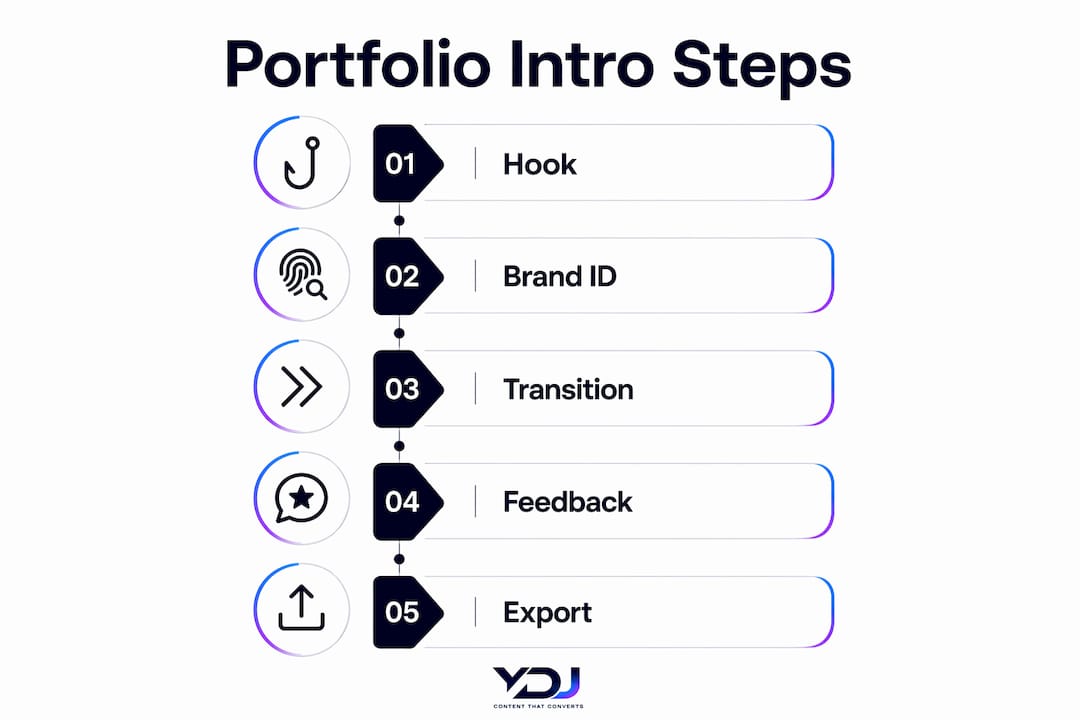
The 3-part intro structure — hook, brand identifier, seamless transition — is a common industry practice because it respects viewer patience while anchoring your brand in memory.
Table of Contents
- Why does a short video intro improve your portfolio results?
- What does a professional portfolio intro actually need?
- How do you build a portfolio intro from brief to export?
- Which tools help you create a portfolio intro fast?
- What export settings and platforms should you plan for?
- How should you present your intro inside your portfolio?
- Key Takeaways
- The part most freelancers get wrong about portfolio intros
- Ydjmedia builds your portfolio intro so you can focus on client work
- Useful sources and tools
Why does a short video intro improve your portfolio results?
A well-crafted intro signals professionalism before a client reads a single word. It tells them you think in systems, you care about presentation, and you deliver polished work. That perception shift happens fast, which is exactly why the intro needs to be short.
The business case is straightforward. Portfolio pages with autoplay video hold visitor attention longer, and a clean intro primes the viewer to receive your work samples with more trust. When you’re pitching a client directly, a reel that opens with a confident, branded intro reads as higher-tier than one that cuts straight to raw footage with no context. The video intro’s conversion impact on portfolio pages is well-documented.
A small, handmade logo reveal communicates something templates rarely can: that you paid attention to the details. Clients notice, and they remember. That’s often what tips them toward recommending you over someone with a longer reel but a generic opener.
Pro Tip: Skip the intro entirely for one-off private deliveries or clips under 30 seconds. The intro earns its place on public portfolio pages, pitch reels, and demo showreels — not on every file you send.
What does a professional portfolio intro actually need?
Three functional parts, and nothing more. A hook, a brand identifier, and a transition into the main content. Each part has a job, and each job has a constraint.

The hook grabs attention in the first half-second. For a motion designer, that might be a kinetic type burst. For a video editor, a fast-cut teaser of your best footage. For a photographer, a color-graded still that snaps into motion. The hook type should match your niche — educational intros front-load a result or a mistake, while brand and commercial intros lead with motion or a product reveal.
The brand identifier follows immediately and runs for 1 second or less. Think of it as a memory anchor, not the main event. A logo lockup, a wordmark, or a color-coded card. Keep it tight.
Key design rules:
- Lock runtime to 3–5 seconds before you design anything — the constraint forces better creative choices
- Use micro-cuts of 0.5–1.5 seconds per frame to maintain visual momentum without chaos
- Keep typography large enough to read on a phone screen at arm’s length
- Balance audio: a music bed or sparse SFX should support the hook, not compete with it
- Match your intro’s color palette and motion language to your overall portfolio design
Pro Tip: Pull your exact brand hex codes and font into the intro file before you start animating. Consistency between your intro and your portfolio design elements is what makes the whole package feel intentional.
How do you build a portfolio intro from brief to export?
Five steps. Each one has a clear purpose, and skipping any of them costs you time later.
- Write a one-line brief. State the niche, the tone, and the one brand asset that must appear. This keeps you from scope-creeping during design.
- Lock the runtime. Set a 3–5 second hard limit in your timeline before you place a single clip. Locking runtime first is the discipline that prevents overlong intros and forces better creative choices.
- Design and animate. Build the hook first, then the brand flash, then the transition. Use micro-cuts (0.5–1.5s) to keep energy high.
- Test in context. Preview the file on your phone before you call it done. Export at 1080p or higher and check that your logo and typography are crisp, not soft or smeared.
- Export platform variants. Deliver a master file plus the formats your portfolio actually needs.
Export checklist:
- Master: — or H.265, 1920×1080, 24 or 30fps, high bitrate (10–20 Mbps for web)
- Vertical variant: 1080×1920 for Reels and TikTok
- Compressed web version: 5–8 Mbps for fast-loading portfolio pages
- File naming:
[ProjectName]_intro_[platform]_[date]keeps versions organized
For client feedback, share a low-res proof export first. Collect notes in one round, revise, then deliver the final variants. Two rounds maximum keeps the project moving.
Which tools help you create a portfolio intro fast?
Pick the tool that matches your goal: speed or craft. Browser-based tools get you a publishable intro in under an hour. Desktop software gives you a signature piece that no template can replicate.
- Adobe Express — drag-and-drop intro templates with logo upload, text animation, and direct export for web and social. Best for freelancers who need something clean and on-brand without a steep learning curve. Adobe Express handles the basics well.
- TechSmith Camtasia — built-in intro templates with Quick Properties for fast customization, plus the ability to save a customized intro for reuse across multiple projects. Strong choice if you produce screen-based or tutorial content.
- VEED.IO — fully browser-based with drag-and-drop editing, royalty-free music, and quick exports. Ideal when you need speed and simplicity without installing anything.
For signature reveals, After Effects paired with Premiere Pro gives you full control over motion, timing, and audio. Custom reveals communicate a level of professional investment that templates rarely match. Motion designers working on high-value client pitches should hand-craft the reveal rather than reach for a preset.
Pro Tip: Templates are fine for your first version. Once you land two or three clients, invest a few hours in a custom reveal. That’s the version you’ll use for the next two years, and it’s the one clients will mention when they refer you.
For freelancers who want to go deeper on video promotion strategy, the Video Marketing Bundle covers tactics and tool workflows worth bookmarking.
What export settings and platforms should you plan for?
Export a high-quality master first, then produce platform-specific variants from it. Never upload your master directly to social — the compression will soften your branding.
| Platform | Resolution | Codec | Frame Rate | Notes |
|---|---|---|---|---|
| Portfolio page (web) | 1920×1080 | — | 24–30fps | 5–8 Mbps; test autoplay on mobile |
| YouTube / Vimeo | 1920×1080 | —/H.265 | 24–30fps | 10–20 Mbps master |
| Instagram Reels / TikTok | 1080×1920 | — | 30fps | Vertical crop; check safe zones |
| Demo reel embed | 1920×1080 | — | 24–30fps | Match host platform’s recommended bitrate |
Autoplay on portfolio pages is muted by default in most browsers, so your intro must work without audio. Make the hook visually self-contained. For Reels and TikTok, check that your logo and text clear the platform’s UI safe zones — the bottom 20% of the frame is often covered by captions or buttons.
Version control tip: Keep a /intro-assets folder with your master, each platform variant, and your source file. Label by date. When you update your branding, you’ll know exactly which files to replace.
How should you present your intro inside your portfolio?
The intro earns its place as part of a project card, not as a standalone clip floating on your homepage. Give it context, and it becomes proof of your process.
- Hero placement. Embed the intro at the top of your portfolio landing page as a looping autoplay (muted). It sets tone immediately without requiring a click.
- Project card layout. Pair the intro with a three-line project description: client context, the creative problem, and your approach.
- Micro-case template. Use this structure for each intro you feature:
- Client: industry and project type
- Role: what you designed or animated
- Assets delivered: master file, platform variants, source project
- Outcome: client feedback or measurable result (view count, booking increase, direct quote)
- Testimonial placement. A short client quote placed directly below the intro embed amplifies trust at the moment a visitor is most engaged.
Custom logo reveals and careful attention to detail are frequently cited by clients as the reason they perceive a freelancer as higher-tier — and recommend them to others.
For more on portfolio layout and conversion, the structure of your project cards matters as much as the intro itself.
Key Takeaways
A professional video intro for your freelance portfolio works because it locks runtime to 3–5 seconds, flashes your brand in 1 second or less, and hands the viewer directly into your best work.
| Point | Details |
|---|---|
| Lock runtime first | Set a 3–5 second hard limit before designing — it forces better creative decisions. |
| Brand flash stays tight | Keep your logo or wordmark to 1 second or less; it’s a memory anchor, not the opener. |
| Test on mobile | Preview on your phone and export at 1080p minimum to keep branding crisp. |
| Export platform variants | Produce a master plus vertical (1080×1920) and compressed web versions separately. |
| Ydjmedia for done-for-you intros | Ydjmedia produces mobile-first portfolio intros with one-time pricing and a free demo before you pay. |
The part most freelancers get wrong about portfolio intros
Most freelancers treat the intro as a showcase of technical skill. They pack in complex transitions, long logo animations, and layered effects — and then wonder why clients skim past it.
The intro is not your demo reel. It’s a handshake. Its only job is to make the viewer feel confident enough to keep watching. A short intro that’s clean, on-brand, and mobile-readable will outperform a longer technical showcase every time, because the viewer never asked for the showcase.
The runtime-lock workflow that Ydjmedia uses — locking to 3–5 seconds before a single frame is designed — exists precisely to prevent this. The constraint isn’t a limitation. It’s what separates intros that convert from intros that impress the person who made them.
Ydjmedia builds your portfolio intro so you can focus on client work
Producing a polished, mobile-first portfolio intro takes time you could spend on paid projects. Ydjmedia handles the full production: rapid prototype, platform-specific variants (horizontal, vertical, web-optimized), and export-ready files delivered at one-time pricing with no monthly fees.
You see the demo before you pay a cent. If it’s not right within 30 days, you get your money back. No agency runaround, no surprise costs. For freelancers who want a client-ready intro without the production overhead, see what Ydjmedia delivers and request your free demo today.
Useful sources and tools
- Adobe Express Intro Maker — browser-based templates with logo upload and direct export for web and social
- TechSmith Camtasia Intro Guide — step-by-step workflow for building and saving reusable intro templates
- VEED.IO Intro Maker — drag-and-drop online editor with royalty-free music and fast export
- How to Create Video Intros That Hook Viewers — the primary reference for runtime rules, micro-cut pacing, and the 3-part intro structure used throughout this guide
- Video Marketing Mayhem — practical workflows and process templates for video creators who want to go deeper
- Ydjmedia Blog — additional guides on portfolio design, video content strategy, and conversion for freelancers and small businesses