
Imagery in web design is defined as the strategic use of visual content, including photos, illustrations, and graphics, to communicate brand identity, guide user behavior, and drive conversions. The role of imagery in web design goes far beyond decoration. 75% of online shoppers rely primarily on product images when making purchase decisions, outranking price, reviews, and written descriptions. That single fact reframes how you should think about every photo on your site. Images are not supporting content. They are your primary sales tool.
How do images influence user engagement and conversion on websites?
Images communicate trust and professionalism before a visitor reads a single word. The human brain processes visuals far faster than text, which means your photos form a first impression in milliseconds. A blurry hero image or a generic stock photo signals low quality before your headline even registers.
Visual storytelling is the practice of using images to carry an emotional narrative that text alone cannot deliver. A photo of a real customer using your service tells a more convincing story than three paragraphs of copy. This emotional connection is what moves visitors from passive browsing to active consideration.

The conversion data backs this up clearly. High-resolution product images increase ecommerce conversion rates by 27% on average, with some A/B tests reaching 45%. That is not a marginal gain. That is the difference between a site that pays for itself and one that bleeds ad spend.
Multiple image angles compound the effect. Landing pages with multiple product views yield 30% higher conversions than those with a single image. Showing your product or service from several perspectives removes the hesitation that kills purchases.
“Imagery’s primary role is emotional storytelling and brand communication, not mere decoration. Every image on your site either builds trust or erodes it. There is no neutral.”
The key behaviors images drive include:
- Attention capture: A strong hero image stops the scroll and anchors the visitor to your page.
- Trust signaling: Real, high-quality photos of your team, workspace, or product signal credibility instantly.
- Decision support: Multiple angles and context shots reduce purchase hesitation by answering visual questions before they form.
- Emotional alignment: Images that reflect your customer’s lifestyle or aspirations create a sense of “this is for me.”
Understanding why service photos improve conversions for small businesses starts with recognizing that images do the persuasion work your copy sets up.
What are the best practices for image quality and optimization in web design?
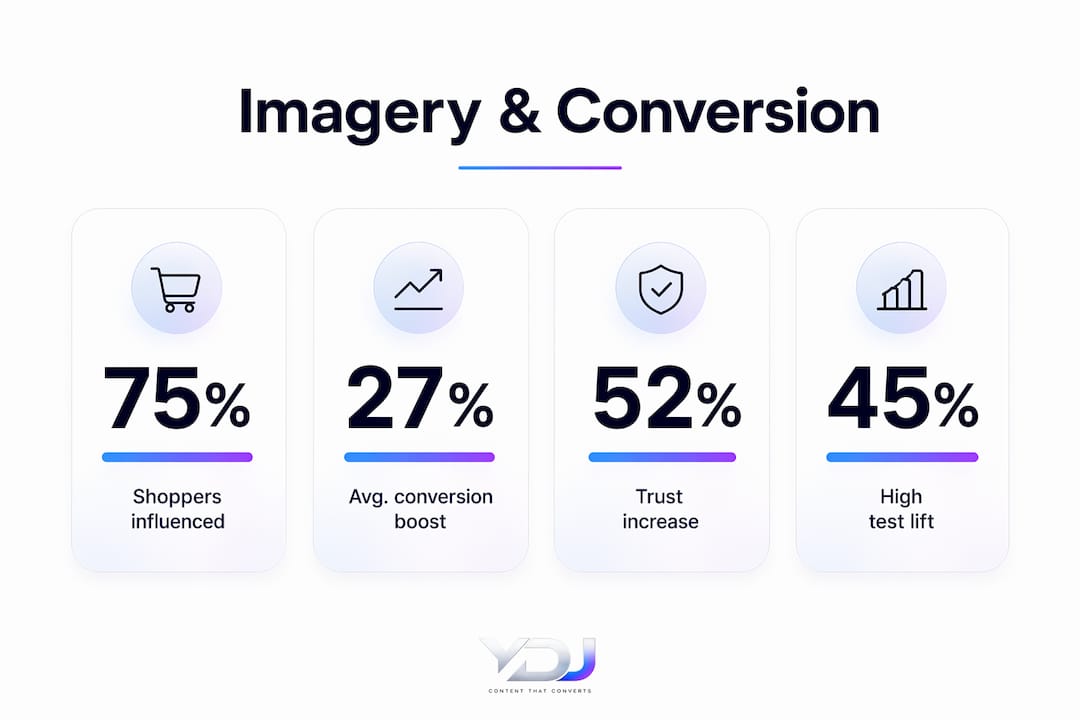
Image quality and technical performance are not competing priorities. You need both. A beautiful photo that takes four seconds to load will cost you more conversions than a mediocre photo that loads instantly.
Follow these steps to get both right:
-
Use high resolution with multiple angles. Show your product or service from at least three perspectives. Include a context shot, a detail shot, and a lifestyle or in-use shot. This combination answers the most common visual questions buyers have before committing.
-
Convert to modern formats. Image compression formats like WebP and AVIF significantly reduce file size while maintaining visual quality. Switching from JPEG to WebP alone can cut file size by 25–34% with no visible quality loss.
-
Set width and height attributes on every image. Failing to define image dimensions before load causes layout shifts, where page elements jump around as images render. This frustrates visitors and signals an unprofessional site.
-
Implement lazy loading. Images below the fold should load only when a visitor scrolls toward them. This reduces initial page weight and speeds up the above-the-fold experience, which is what Google and your visitors judge first.
-
Use priority hints for hero images. Your hero image should load immediately. Mark it with a high-priority fetch hint so the browser does not treat it equally with images further down the page.
-
Balance quality with load speed. Images and video account for over 70% of downloaded website data. Every 100ms of delay from heavy media costs a 7% drop in conversions. Compress aggressively, but always check the output visually before publishing.
Pro Tip: Run your images through a compression tool before uploading, then test your page speed with Google PageSpeed Insights. Aim for a Largest Contentful Paint score under 2.5 seconds. That single metric captures most of the conversion damage caused by slow images.
Optimizing existing images is one of the highest-ROI changes you can make to a website. You do not need new photography. You need better delivery of what you already have. For more on this, the website conversion optimization tips for entrepreneurs cover the technical side in practical detail.
How does visual consistency and brand alignment enhance the role of imagery?
Visual consistency is the practice of using a unified color palette, lighting style, and image treatment across every photo on your site. When done well, visitors perceive your brand as professional and trustworthy without consciously noticing why. When done poorly, the site feels assembled rather than designed.
Consistent visual branding with carefully chosen imagery increases perceived trustworthiness by 52%. That is a measurable lift in credibility from a design decision, not a marketing campaign. The implication is direct: inconsistent imagery actively costs you trust.
The stock photo problem is real. Professional, unique photography creates stronger emotional connections and credibility than stock images. Generic stock photos are perceived as unprofessional and can increase bounce rates. Visitors recognize stock imagery. It signals that you did not invest in showing them your actual business.
Key elements of visual consistency include:
- Color palette alignment: Photos should complement your brand colors, not clash with them. A warm-toned brand using cold, blue-tinted photos creates a subconscious disconnect.
- Lighting style: Consistent lighting, whether bright and airy or moody and dramatic, unifies the visual experience across pages.
- Subject framing: Consistent crop ratios and subject positioning create a grid that feels intentional rather than random.
- Image treatment: Applying the same filter, contrast level, or editing style to all photos ties them together visually.
Pro Tip: Create a one-page visual style guide before sourcing any photography. Define your approved color range, lighting preference, and crop ratios. Share it with every photographer or designer you work with. This single document prevents the inconsistency that undermines brand trust.
Images also need to work with your copy and layout, not against them. A photo of a smiling customer placed next to a testimonial amplifies both elements. The same photo dropped randomly into a pricing section adds noise. Placement is a structural decision. Learn more about how consistent branding online compounds trust over time.
What are common pitfalls when using imagery in web design?
Most image mistakes on websites are not creative failures. They are process failures. The fix is usually a checklist, not a redesign.
Watch for these specific problems:
- Low-quality or generic stock images. Visitors recognize staged stock photos immediately. They reduce credibility and increase bounce rates. Replace them with real photos of your team, space, or work.
- Unoptimized images causing slow load times. Uploading a 4MB JPEG directly from a camera is the single most common technical mistake on small business websites. Compress every image before it touches your server.
- No responsive sizing. An image that looks great on desktop can overflow or pixelate on mobile. Use responsive image techniques, such as the
srcsetattribute, to serve the right image size for each screen. - Missing alt text. Alt text is not optional. It serves screen readers for visually impaired visitors and tells search engines what your image contains. Every image needs a descriptive alt tag.
- No A/B testing. You cannot know which hero image converts better without testing. Run split tests on your most trafficked pages and let data, not preference, decide.
The homepage mistakes that cost you clients often trace back to exactly these image errors. A slow, visually inconsistent homepage is a conversion killer that most business owners do not diagnose until they check their analytics.
| Common mistake | Practical fix |
|---|---|
| Generic stock photos | Commission real photography or use candid team shots |
| Oversized image files | Compress to WebP or AVIF before uploading |
| Missing alt text | Write a descriptive alt tag for every image on the page |
| No mobile testing | Preview every image on a real mobile device before launch |
| Single product image | Add at least three angles or context shots per product |
Key takeaways
Images are the primary conversion tool on any website, and optimizing them for quality, speed, and brand consistency delivers measurable revenue gains without requiring new content.
| Point | Details |
|---|---|
| Images drive purchase decisions | 75% of online shoppers rely on product images more than price or reviews. |
| Multiple angles lift conversions | Landing pages with several image views convert 30% better than single-image pages. |
| Speed is a conversion factor | Every 100ms of load delay from heavy images costs a 7% drop in conversions. |
| Visual consistency builds trust | Aligned imagery increases perceived trustworthiness by 52% across a site. |
| Alt text and responsiveness matter | Missing alt text and poor mobile sizing hurt both accessibility and search rankings. |
Why I think most websites treat images as an afterthought
I have reviewed hundreds of small business websites, and the pattern is almost always the same. The copy gets revised three times. The color palette gets debated for a week. Then someone drops in a stock photo from a free library and calls the site done.
That is backwards. Images do more persuasion work than copy on most pages. A visitor who does not connect with your hero image will not read your headline. You cannot write your way past a bad photo.
The other thing I see constantly is business owners sitting on a goldmine of existing images they never optimized. A photographer delivered 80 photos. Twenty went on the site as raw files. The page loads in six seconds. The fix costs nothing except an hour of compression work, and it can recover thousands in lost conversions.
My honest advice: treat your image library as a revenue asset. Audit it quarterly. Test your hero images the same way you test ad creative. And if you are still using stock photos of people shaking hands in a conference room, replace them this week. Real photos of your actual business, even imperfect ones, outperform polished stock every time.
The role of testimonials in conversions is a good parallel here. Just as a real customer quote outperforms a generic endorsement, a real photo of your work outperforms any stock image. Authenticity converts.
— Youri
How Ydjmedia builds websites where imagery works harder
Ydjmedia builds mobile-first websites where every image is selected, sized, and compressed for maximum performance and conversion impact. The team handles the full visual strategy, from choosing the right photos for each section to implementing WebP delivery and lazy loading so your site loads fast on every device.
Every Ydjmedia project starts with a free demo site, so you see exactly how your images and brand look live before spending a dollar. There are no retainers, no surprise fees, and a 30-day money-back guarantee. If you want a website where your visuals actually convert visitors into customers, Ydjmedia delivers that with clear pricing and zero risk.
FAQ
What is the role of imagery in web design?
Imagery in web design communicates brand identity, builds visitor trust, and drives conversions. It is the primary visual tool that guides user decisions before copy is read.
How much do images affect website conversion rates?
High-resolution images increase conversion rates by 27% on average, with some tests reaching 45%. Multiple product angles lift conversions by an additional 30% compared to single-image pages.
What image formats are best for web performance?
WebP and AVIF are the best formats for web use. They reduce file size significantly compared to JPEG and PNG while maintaining visual quality, which improves load speed and reduces conversion loss.
Why does visual consistency matter for branding?
Consistent imagery across a website increases perceived trustworthiness by 52%. Mismatched photo styles, lighting, and color tones signal an unprofessional brand and reduce visitor confidence.
Should I use stock photos or custom photography on my website?
Custom photography outperforms stock photos for credibility and emotional connection. Generic stock images are recognized by visitors and can increase bounce rates, while real photos of your business build authentic trust.