
Run an 8–12 piece testimonial engine that places outcome-specific proof next to every major CTA on your site, refreshes quarterly, and starts with a single automated email to your three most recent happy customers. That’s the whole system. Everything else is execution.
Start here, right now:
- Identify your three most recent customers who got a clear, measurable result from your product or service.
- Draft a 3–4 sentence testimonial for each of them based on what you know about their outcome, then email it and ask for approval or edits.
- Pick one page on your site where visitors are most likely to bounce (usually pricing or your main service page) and commit to placing the first approved testimonial there by end of week.
If you’re a solo operator or running a small team, the person who handles customer follow-up owns step one. That’s it. One person, one email, one page. You can build the rest of the system around that first win.
Table of Contents
- Why do testimonials actually increase conversions?
- How do you collect high-quality testimonials reliably?
- Where should you place testimonials for maximum impact?
- Which testimonial formats work best for each goal?
- How do you reuse testimonials across other channels?
- How do you measure whether your testimonials are actually working?
- What tools help you automate and manage testimonials?
- A practical implementation checklist you can run this week
- Key Takeaways
- The honest truth about testimonial strategy for small businesses
- Further reading and sources used in this guide
Why do testimonials actually increase conversions?
Visitors don’t leave your site because they dislike your offer. They leave because they’re uncertain. A well-placed testimonial answers the exact question a buyer is silently asking at that moment, and that’s what makes it convert.

Placement near CTAs can increase click-through significantly, and pricing page testimonials can reduce purchase abandonment notably. Those aren’t small numbers for a small business. A single testimonial in the right spot can do more work than a redesigned hero section.
Here’s the contrast that matters. Bury a glowing quote in a dedicated “Testimonials” page that visitors rarely find, and it does almost nothing. Place that same quote directly above your “Get a Quote” button, and it answers the buyer’s last hesitation right before they click. The role of testimonials in conversions is less about volume and more about timing and proximity.
The most persuasive testimonials follow a simple structure: the client’s problem, the approach taken, and a measurable result. Generic praise (“Great service!”) gives a visitor nothing to project onto their own situation. A quote that says “We cut our onboarding time by 40% in the first month” gives them a concrete outcome to imagine for themselves. That specificity is what tips a fence-sitter into a customer.
How do you collect high-quality testimonials reliably?
The biggest mistake small businesses make is treating testimonials as an occasional ask. You send one email after a big project, get one response, and call it done. A real collection system ties requests to events, pre-drafts the copy, and runs without you having to remember.
Build your trigger list first. These are the moments that should automatically prompt a testimonial request:
- A customer completes onboarding or their first major milestone.
- An NPS survey returns a score of 9 or 10 (promoters are your easiest converts).
- A customer renews, upgrades, or makes a repeat purchase.
- A project or engagement officially closes with a positive outcome.
- A customer mentions a win in a support chat, email, or review.
Email template (copy and adapt):
Subject: Quick favor, [First Name]?
Hi [First Name], I noticed [specific outcome or milestone, e.g., “you just wrapped up your website launch”]. That’s a real win, and I’d love to share your story with others who are in the same spot you were.
I took a shot at drafting something based on what we worked on together. Feel free to edit, shorten, or rewrite it entirely:
"[Pre-drafted 3–4 sentence testimonial: describe their starting problem, what you did together, and the result they got. Be specific. Use numbers if you have them.]"
If that works, just reply with a thumbs up and I’ll use it on our website. If you’d rather tweak it, go for it. Either way, I appreciate you.
In-app or modal request (shorter version):
Pre-drafting the testimonial dramatically increases approval rates because it removes the blank-page problem. Most customers want to help but don’t know what to write. Hand them something polished and specific, and most will approve it within 24 hours.
Consent checklist before you publish:
- Written approval from the customer (email reply counts; a formal release is better).
- Permission to use their name, title, company, and photo.
- Clarity on where it will appear (website, ads, social, email).
- FTC compliance: the testimonial must reflect a genuine, typical experience. If the result is exceptional, note that it may not be typical. The FTC’s truth-in-advertising guidelines require that endorsements be honest and not misleading.
Pro Tip: Write the pre-draft immediately after a customer call or project close, while the details are fresh. A specific, outcome-focused draft takes about five minutes and converts far better than a vague ask sent weeks later.
Where should you place testimonials for maximum impact?
Place outcome-specific proof adjacent to the CTA or decision point it directly addresses. An ROI quote belongs near your pricing button. A support testimonial belongs near your FAQ or help section. The closer the proof is to the moment of doubt, the more it converts.

Page-by-page placement guide
| Page | Testimonial type | Placement target | Count |
|---|---|---|---|
| Homepage | Broad outcome, brand credibility | Below hero, above fold | 2–3 |
| Pricing page | ROI-focused, cost-objection handler | Adjacent to price tiers or CTA | 2–3 |
| Service/feature page | Feature-specific, problem/solution | Inline, near the relevant feature | 1–2 per page |
| Signup/checkout | Short trust signal, risk reducer | Above the submit button | 1 |
| Dedicated proof page | Mixed formats, full case studies | Grid or carousel layout | 4–6 |
Targeting a moderate number of high-quality testimonials across key pages is the right range for most small business sites. More than that, and you risk the “trophy shelf” effect: a crowded grid that signals desperation rather than confidence. A curated set of 8–12 strong quotes with breathing room around them converts better than a crowded collection of uncurated testimonials.
Design rules that make testimonials work:
- Keep quotes under 75 words. Longer quotes lose readers.
- Always include the person’s full name, title, and company. Anonymous quotes carry almost no weight.
- Add a headshot or company logo when you have one. Photos alongside quotes increase perceived credibility.
- Use high contrast between the quote text and background. Light gray on white fails accessibility standards.
- Design for mobile first. A three-column grid that looks great on desktop often collapses into an unreadable mess on a phone.
- Lazy-load video testimonials and compress images. A testimonial section that slows your page load by two seconds costs you more than it earns.
Map each testimonial to a specific buyer objection, then place it within close visual proximity to the CTA that objection affects. This is the single highest-leverage placement decision you can make.
Which testimonial formats work best for each goal?
Match the format to the decision stage. Short text quotes work for scanning visitors who are still forming an opinion. Video builds deep trust for visitors who are close to buying. Case studies close high-stakes deals where the buyer needs to justify the decision internally.
Short annotated examples
1. Hero quote (homepage, above the fold) A single, bold sentence from a recognizable client. “We booked 12 new clients in 30 days after the site launched.” Name, title, company, headshot. No paragraph, no backstory. Scan-friendly and immediate.
2. Video testimonial (landing page or service page) A 30–90 second clip where the customer describes the problem they had, what changed, and the result. Short video testimonials capture attention more effectively than text alone and are especially powerful for service businesses where trust is the primary barrier.
3. ROI-focused quote (pricing page) “We were spending $2,000 a month on ads with no results. After switching, we cut that in half and doubled our leads.” Specific numbers, placed directly above or beside the pricing CTA. This format addresses the cost objection head-on.
4. Feature-specific inline quote (service or feature page) A short quote that references the exact feature or service described on that section of the page. “The mobile version of our site is what finally got customers to book online.” Place it inline, right after the feature description.
5. Compact case study (dedicated proof page or proposal) Three short paragraphs: the client’s situation before, what was done, and the measurable outcome. Link to it from the homepage or pricing page for buyers who want more detail before committing.
Format decision matrix
| Objective | Best format | Effort level |
|---|---|---|
| Awareness / first impression | Short hero quote, star rating | Low |
| Consideration / feature evaluation | Feature-specific quote, video clip | Medium |
| Purchase decision | ROI quote, compact case study | Medium–High |
| High-stakes B2B close | Full case study, video testimonial | High |
Pro Tip: Every testimonial you publish should include at least one verifiable signal: a real name, a job title, a company name, and ideally a photo or short video clip. Anonymous quotes are ignored. Named, attributed quotes with a face attached are believed.
How do you reuse testimonials across other channels?
Each approved testimonial is a content asset. Repurpose it by trimming or expanding for each channel, not by creating something new every time.
The same quote that lives on your pricing page can become a tweet, a LinkedIn post, a pull-quote in an email nurture sequence, a slide in a sales deck, and a caption on a paid ad. The core content is identical. The format changes.
Channel repurposing checklist:
- Email drip: Pull a short quote (one to two sentences) into a nurture email at the consideration stage. Pair it with a link to the full case study or service page.
- LinkedIn posts: Screenshot the testimonial card from your website or write it out as a post with the customer’s name and outcome. Tag the customer if they’re comfortable with it.
- Paid ads: Short, specific quotes with a face and name outperform generic ad copy. Use the same ROI-focused quotes you placed on your pricing page.
- Sales decks: Add a slide with two or three outcome-focused quotes that match the prospect’s industry or problem. Relevant proof closes faster than generic proof.
- Support and FAQ pages: Place testimonials that mention ease of use or great support near your help content. It reduces pre-purchase anxiety.
For teams using automated marketing funnels, testimonials slot naturally into the middle and bottom of the funnel, where buyers are comparing options and need reassurance.
Pro Tip: Build a searchable testimonial library, even if it’s just a shared Google Sheet. Tag each entry by buyer persona, objection it addresses, and channel it’s been used on. When a sales rep needs proof for a specific prospect, they can find the right quote in under a minute instead of digging through old emails.
How do you measure whether your testimonials are actually working?
Measure testimonial performance by tracking the CTAs they sit next to, form starts, and conversion rate changes through A/B tests. Gut feel is not a measurement plan.
KPIs to track:
- CTA click-through rate on pages with testimonials vs. pages without.
- Form starts and completions on pages where testimonials are placed above the form.
- Overall page conversion rate before and after adding or moving a testimonial.
- Time on page and scroll depth (do visitors read past the testimonial section?).
- Video watch rate for any video testimonials (aim for at least 50% completion).
Simple A/B test plan:
- Hypothesis 1: Adding a testimonial above the CTA on the pricing page will increase clicks by at least 10%. Run for three to four weeks or until you reach statistical significance.
- Hypothesis 2: A single hero quote above the fold converts better than a three-quote grid below the fold. Split traffic 50/50 and measure form starts.
- Hypothesis 3: A video testimonial on the service page increases time on page compared to a text quote. Track average session duration and scroll depth.
A/B tests on placement and format can shift conversion rates noticeably in small experiments. That’s a meaningful lift for a small business site without any additional ad spend.
Refresh cadence: Review your testimonial set at least once per quarter. Retire any quote older than 18 months unless it comes from a well-known brand-name client whose name still carries weight. Stale testimonials signal a stagnant business. Fresh, recent proof signals momentum.
What tools help you automate and manage testimonials?
Use tooling to automate asks, pre-draft copy, surface high-impact quotes, and embed display widgets. You don’t need an expensive platform to start. You need the right category of tool for each job.
Tool categories and what they do:
- Testimonial collection platforms: These send automated requests, collect responses, and store approvals in one place. Look for platforms that support pre-drafted copy and consent capture.
- Email automation triggers: Connect your CRM or email platform to fire a testimonial request when a customer hits a trigger event (NPS score, project close, renewal). Most email platforms support this with basic automation rules.
- Widget and embed services: These pull approved testimonials from a central library and display them on your site as cards, carousels, or grids. They update automatically when you add new testimonials.
- Simple video-recording tools: Short async video tools let customers record a 30–90 second clip from their phone or laptop without scheduling a call. Lower friction means higher completion rates.
- AI summarization and sentiment scoring: AI tools can scan a batch of customer feedback, identify the highest-sentiment responses, and suggest which quotes are most likely to convert. They can also help you draft the pre-approved testimonial copy faster.
Risks and how to handle them:
- Never publish a testimonial that has been edited to change its meaning. Trim for length only, and always get re-approval after any edit.
- Capture consent in writing before publishing anywhere, including social media and paid ads.
- Never use AI to generate a testimonial from scratch and present it as a real customer’s words. That’s fabricated evidence and an FTC violation.
- Disclose any material connection between the reviewer and your business (e.g., a discount given in exchange for a review).
Workflow in plain terms: A trigger fires (NPS score, project close) → the system sends a collection request with a pre-drafted copy option → the customer approves or edits → you tag the testimonial by persona and objection → it publishes to the relevant page widget → you track the CTA performance in your analytics.
Pro Tip: Set a calendar reminder to audit your testimonial library every 90 days. Check which quotes are getting the most scroll depth and CTA clicks, retire the weakest performers, and queue up new collection requests for recent wins.
A practical implementation checklist you can run this week
Assign three roles and run a seven-day sprint to add or refresh three to five high-impact testimonials on your most important pages. That’s the minimum viable system for a small team.
Three roles:
- Owner/Approver: Reviews and approves testimonials before they go live. Sets quality standards.
- Collector: Sends requests, manages follow-ups, and handles consent.
- Publisher: Formats and places approved testimonials on the correct pages.
One person can hold all three roles in a solo operation. In a small team, split them to avoid bottlenecks.
Seven-day sprint:
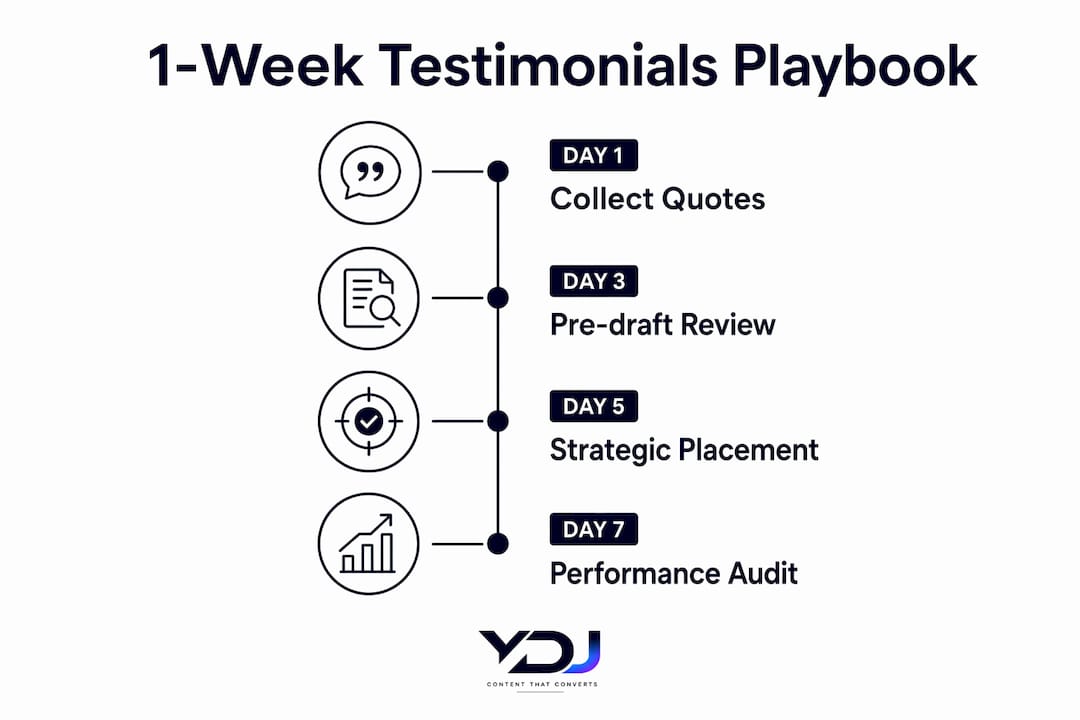
- Day 1: Collector identifies three to five recent customers with clear outcomes. Drafts pre-written testimonials for each. Sends the email template.
- Day 2: Collector follows up with anyone who hasn’t opened the email. Owner reviews the draft copy for quality and specificity.
- Day 3: Collector sends a second follow-up to non-responders. Owner approves any responses that have come in.
- Day 4: Publisher formats approved testimonials (name, title, company, photo if available) and prepares them for placement.
- Day 5: Publisher places testimonials on the homepage (above fold 2), pricing page (adjacent to CTA), and one service page (inline). Owner does a final review.
- Day 6: Owner checks mobile display and page load speed. Publisher fixes any layout issues.
- Day 7: Collector sets up the first automated trigger (NPS follow-up or project-close email). Owner sets a 90-day calendar reminder for the next refresh.
Timeline and refresh schedule
| Phase | Action | Owner | Deadline |
|---|---|---|---|
| Day 1 | Draft and send collection emails | Collector | End of Day 1 |
| Day 3 | Follow up, approve first responses | Collector + Owner | End of Day 3 |
| Day 5 | Approve and format testimonials | Owner + Publisher | End of Day 5 |
| Day 7 | Publish and set automation trigger | Publisher + Collector | End of Day 7 |
| 90 days | Quarterly refresh: retire old, add new | All three roles | Recurring |
| 18 months | Mandatory review: retire dated quotes | Owner | Recurring |
Quality checklist for every testimonial before it goes live:
- Specific outcome mentioned (not just “great service”).
- Full name, title, and company included.
- Written consent on file.
- Photo or logo attached if available.
- Placed on the page where it addresses the most relevant buyer objection.
- FTC-compliant: reflects a genuine, non-misleading experience.
Key Takeaways
A strong customer testimonials website strategy places 8–12 outcome-specific, attributed quotes at decision points across your site, automates collection through trigger events, and refreshes the set at least quarterly to maintain credibility.
| Point | Details |
|---|---|
| Target a moderate number of testimonials, placing several on the homepage, a few on pricing, and one or two per service page. | |
| Place proof next to CTAs: Testimonials adjacent to CTAs can increase click-through considerably. | |
| Pre-draft for customers | Writing the testimonial for customers and asking for approval dramatically increases response rates. |
| A/B test placement and format | Small format and placement changes can shift conversion rates noticeably. |
| Refresh every 90 days | Retire quotes older than 18 months and queue new requests after every major customer win. |
The honest truth about testimonial strategy for small businesses
Most small businesses treat testimonials as an afterthought. They collect a few quotes after a big project, paste them onto a dedicated page nobody visits, and wonder why they’re not converting. The problem isn’t the testimonials. It’s the system, or the lack of one.
What actually works for small teams is a tight, automated pipeline that ties requests to real events, pre-drafts the copy so customers can approve rather than create, and places proof exactly where doubt lives on the page. Not on a trophy shelf. Not in a footer. Right next to the button a visitor is about to click or abandon.
The businesses that see the biggest lift from testimonials aren’t the ones with the most quotes. They’re the ones with the most specific quotes in the most strategic spots. An ROI-focused testimonial directly above a pricing CTA does more work than a dozen generic five-star ratings buried on a separate page.
One more thing worth saying: the collection step is where most people stall. Asking a customer to write something from scratch is a big ask. Pre-drafting it for them and asking for a thumbs up is a small one. That single shift, from “Can you write us a testimonial?” to “Here’s a draft based on your results, does this look right?”, significantly increases response rates.
If you want to see how this plays out in practice, Ydjmedia’s website conversion optimization guide walks through how proof placement fits into a broader conversion strategy for small business sites.
Further reading and sources used in this guide
- How to Use Testimonials on Your Website for Maximum Impact — Placement counts, format recommendations, and refresh cadence guidance used throughout this guide.
- How to Display Testimonials on Your Website: Placement, Formats & Examples | Shoutjar — Source for CTA-adjacent placement data (25% click-through lift, 18% abandonment reduction) and A/B testing guidance.
- How to Get Customer Testimonials for Your Website (That Actually Convert) — Pre-drafting methodology and approval workflow.
- Customer Testimonials: The Complete Guide to Types, Collection, and Strategy | Credibly — Automation triggers, NPS pipeline, and three-role team structure.
- B2B Social Proof Strategy That Converts | LOW/CODE — Problem → approach → result testimonial structure and objection-mapping framework.
- The Role of Testimonials in Conversions: 2026 Guide | Ydjmedia — Internal analysis of testimonial formats and conversion mechanics for small business sites.
- Video Content Benefits for Service Businesses | Ydjmedia — Supporting evidence for short video testimonial effectiveness.
- 9 Ways to Showcase Services Online and Win More Clients | Ydjmedia — Placement tactics for professional service pages.
- Convert Website Visitors into Clients | Webmycel — Funnel-stage repurposing tactics for testimonials in email and landing page sequences.